Free Domain WHOIS Lookup Tool: Unlock Any Domain’s Real Story in Seconds

Ever typed a domain into Google and wondered, “Who actually owns this thing?” Or maybe you’re eyeballing a domain for sale and want to know if it’s about to expire or locked down tighter than Fort Knox. I’ve been in that spot more times than I can count — chasing leads for client sites, checking competitors, or just making sure I’m not buying a lemon. That’s exactly why a solid domain WHOIS lookup tool has become one of my go-to free resources.
The one I keep coming back to is the free Domain WHOIS checker over at SeoPerc. It’s clean, lightning-fast, and built on the modern RDAP system instead of the clunky old WHOIS protocol most people still think of. No ads, no sign-ups, no nonsense — just straight answers about any domain you throw at it.
What Exactly Is a Domain WHOIS Lookup?
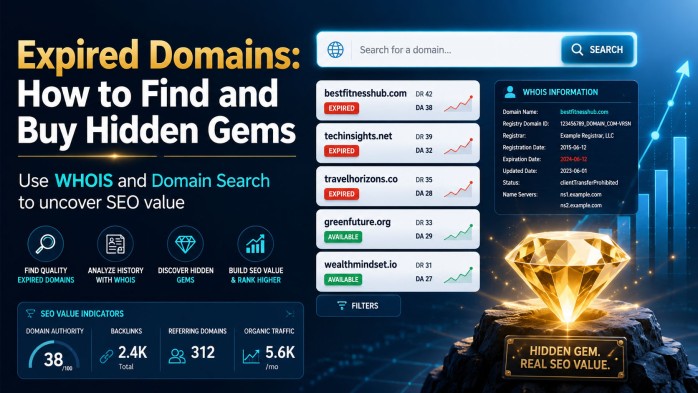
Think of WHOIS like the public phonebook of the internet. Every domain name has to be registered with a registrar (think GoDaddy, Namecheap, Porkbun, etc.), and that registration creates a public record. A WHOIS lookup pulls up details like:
- Who registered it
- When it was created and when it expires
- The registrar’s contact info
- Nameservers
- Domain status flags
- Whether privacy protection is turned on
Back in the day this info was wide open. Today, thanks to privacy laws like GDPR, a lot of personal owner details are redacted — which is why you often see “REDACTED FOR PRIVACY” instead of someone’s home address.
Why SeoPerc’s Tool Stands Out (Hint: It Uses RDAP)
Seriously, it couldn’t be simpler:
- Head over to the SeoPerc Whois Domain tool page.
- Type the domain name (example: seoperc.com or yourtargetsite.com — no need for www or https).
- Hit the big “Get WHOIS” button.
- Boom — instant results.
You’ll see everything laid out clearly: expiration date, registrar name, abuse contact, privacy status, DNSSEC info, and domain lock flags. No scrolling through walls of text like the old days.
Pro tip: I always copy the registrar’s abuse email while I’m there — super handy if you ever need to report spam or phishing from that domain.
How the Tool Actually Works Behind the Scenes
When you click that button, the tool sends a quick query to the official RDAP servers run by the registries. It pulls the freshest data available (not some cached database that’s weeks old). Everything comes back in clean JSON format, which is why the results look so sharp and readable.
Because it uses RDAP instead of legacy WHOIS, you don’t run into those “no match” errors on new extensions or international domains. It’s also more privacy-friendly and secure by design.
What Can You Actually Use a Domain WHOIS Lookup For?
This isn’t just nerdy trivia — here are the real-world ways I use it almost every week:
- Domain buying & expired domain hunting — Check creation date and expiration. An old domain with clean history can be gold for SEO.
- Competitor research — See how long they’ve owned the domain and who their registrar is (sometimes it hints at their hosting setup).
- Security & spam checks — Is the domain locked with “clientTransferProhibited”? That’s a good sign they care about security. Is DNSSEC enabled? Even better.
- Trademark or legal disputes — Need proof of ownership dates? Screenshot the WHOIS.
- Troubleshooting your own sites — Confirm nameservers changed correctly or spot if your domain is about to expire (trust me, you don’t want that surprise).
One thing I love: checking a domain does zero damage to its SEO. Google doesn’t care if you look up who owns it.
Frequently Asked Questions About Domain WHOIS
Q: Why is most owner information hidden now?
A: Privacy laws (especially GDPR in Europe) made registrars hide personal details by default. You’ll usually just see “Whois Privacy” or “REDACTED FOR PRIVACY.” That’s normal and actually a good thing for regular folks.
Q: Does running a WHOIS lookup hurt the domain’s SEO?
A: Not even a little. I’ve heard this myth for years and it’s complete nonsense. Querying public records has zero impact on rankings.
Q: What does “clientTransferProhibited” mean?
A: It’s a domain lock. The owner has protection turned on so nobody can steal or transfer the domain without their approval. Most serious sites use this — it’s a smart security move.
Q: Can I check brand-new TLDs like .io or .ai?
A: Absolutely. Because SeoPerc uses RDAP, it handles every extension out there, including the fancy new ones that break older tools.
Q: Is the tool really free and unlimited?
A: Yep — no hidden limits, no sign-up, no catch. I’ve used it dozens of times in a single day without issues.
Q: Should I enable DNSSEC on my own domain?
A: If you care about security (and you should), yes. It adds a digital signature to your DNS records so visitors know they’re hitting the real site and not a fake one. The tool shows you instantly whether a domain has it turned on.
Final Thoughts
Whether you’re a blogger, SEO pro, domain investor, or just curious about that shady-looking website that keeps popping up in your ads, a quick WHOIS check gives you the full picture. And the free tool at SeoPerc makes it ridiculously easy.
Go give it a spin right now: Domain WHOIS Lookup Tool — you’ll wonder how you ever lived without it.Have a favorite use for WHOIS lookups? Drop it in the comments — I’m always looking for new tricks!